.avif)


What Does an IT Support Contract Include for a Small Business?

Daniel

Introduction to IT Support Contracts
In today’s fast-paced digital world, IT support contracts have become a cornerstone for businesses looking to safeguard their operations and data. These agreements ensure that your IT infrastructure remains secure, efficient and resilient against evolving cyber security risks. With cyber attacks on the rise, having a robust IT support contract means your business benefits from expert support, secure access to critical systems and rapid response to any issues that arise. This proactive approach not only helps prevent downtime but also strengthens your overall security posture, giving you peace of mind that your business is protected and your data remains secure.
Benefits of IT Support Contracts
Partnering with a trusted IT service provider through a support contract brings a host of advantages to small and medium-sized organisations. One of the most significant benefits is enhanced cyber security, as your provider can implement and maintain best practices aligned with the Cyber Essentials scheme - a government-backed framework developed by the National Cyber Security Centre. This ensures your organisation is protected against common threats and meets essential security standards. Additionally, IT support contracts offer flexibility to scale services as your business grows, cost savings through predictable monthly fees, and access to a team of experts who can provide ongoing support and guidance. For organisations looking to strengthen their IT infrastructure without large upfront investments, these contracts deliver practical support and peace of mind.
Key Takeaways
- A small business IT support contract typically covers day-to-day helpdesk support, proactive monitoring, security management, backups, and clear response times - all for a predictable monthly fee.
- A good contract defines responsibilities on both sides (what the provider does versus what the business must do), so there are no surprises when something goes wrong.
- Most UK small businesses in 2025 choose a fixed monthly “managed IT” contract rather than pay-as-you-go break-fix, because it’s easier to budget and reduces downtime risk.
- Important gaps to watch for include cyber security coverage, backup and recovery provisions, and out-of-hours support - these are often assumed but not always included.
- This article walks through each part of a typical contract in plain English, so a non-technical owner or manager can compare it against their current agreement.
What an IT Support Contract Usually Includes (Straight Answer First)
An SME IT support contract typically includes helpdesk support for everyday issues, device and server monitoring, security updates, backup management and agreed response times - all wrapped into a fixed monthly fee. For most small businesses, this arrangement exists to prevent problems before they disrupt day-to-day operations.
- For a 10–50 person UK business, this usually covers laptops, desktops, basic servers (if any), Microsoft 365, and the favourite apps your team uses every day, such as Excel, PowerPoint and more apps included in the Microsoft 365 suite.
- Not everything is automatically covered. Project work like office moves, new server installations, or major upgrades is often chargeable on top and the contract should say so clearly.
- The rest of this article breaks down each element so you can check your own contract line by line.
Helpdesk Support: What “Day-to-Day IT Help” Really Means
A helpdesk is your first point of contact when something goes wrong. For a small business, this means everyday issues: forgotten passwords, printer problems, error messages that won’t go away and the classic “my email has stopped working.”
- Typical channels and hours: Most providers offer phone, email, and remote support tools. Standard UK business hours are usually Monday–Friday, 8:30–17:30, excluding bank holidays. Some contracts include extended hours but this is often an extra.
- Response time commitments (SLAs): Your contract should specify how quickly you’ll hear back. For example, critical issues might require a response within 1 hour, while minor tickets get attention within 4 or 8 hours. These service level agreements should be written into the contract, not just promised verbally.
- Response vs resolution time: There’s a difference worth understanding. Response time is when someone acknowledges your issue and starts working on it. Resolution time is when the problem is actually fixed. Contracts rarely guarantee a fix by a specific time - only a start time.
- Limits on coverage: Check whether the contract specifies the number of users or devices covered, how new starters and leavers are added or removed and whether there’s any cap on ticket volumes or “fair use” wording.
Here’s how it typically works in practice: an office manager at a 20-person firm notices that three staff can’t access Microsoft Teams on a Tuesday morning. They log a ticket via email. The service provider acknowledges the issue within 30 minutes (meeting their P2 SLA), connects remotely to diagnose the problem and restores access within two hours. The ticket is closed with a brief note explaining what happened.
Proactive Monitoring, Maintenance and Patching
There’s a significant difference between “waiting for things to break” and proactive IT support. Proactive management means monitoring systems continuously, installing software updates regularly and spotting problems before staff are disrupted.
- Remote monitoring and management (RMM): In non-technical terms, this involves small software agents installed on your PCs and servers that send health data - disk space, processor usage, failed backups - back to the provider. They can often fix issues remotely before anyone in your office notices.
- Routine maintenance covered: This typically includes Windows and macOS updates, security patches, disk clean-ups, scheduled restarts out of hours, and basic performance tuning. Keeping operating systems up to date and supported is essential for compliance and proactive IT management.
- Patch schedules: The contract should specify how often patches are applied (for example, monthly patch cycles for routine updates, emergency patches within 48 hours for critical vulnerabilities) and what happens when an update causes problems.
- Hardware and warranty monitoring: A good provider tracks warranty expiry dates and makes recommendations when devices are too old or approaching end of support. For example, pre-2019 PCs running Windows 10 will face end-of-support in late 2025 - your provider should flag this well in advance.
For directors and finance managers, proactive monitoring translates to fewer surprise outages, reduced overtime for staff dealing with IT problems and more predictable replacement planning for ageing devices.
Cyber Security Services Inside (and Outside) the Contract
In 2025 security is usually woven into IT support, but the exact level varies widely between providers and should be spelled out in your contract. Don’t assume your business is protected - check what’s actually included.
Baseline security services typically included:
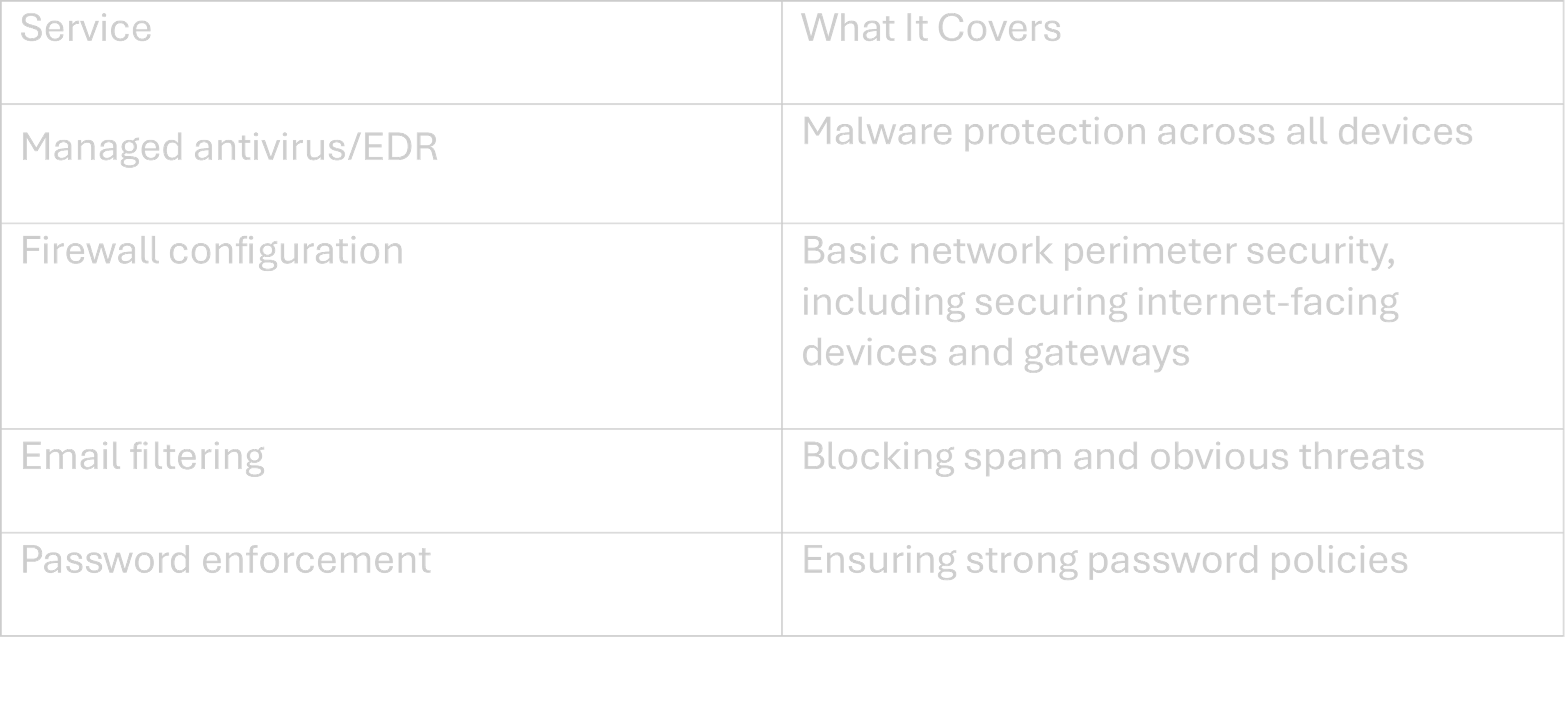
Extras that might be optional or charged separately:
- Advanced threat detection and dark web monitoring
- Staff phishing awareness training
- Support for Cyber Essentials or Cyber Essentials Plus certification (a government backed certification scheme assessed by a certification body)
- Security incident response planning
Cyber Essentials certification requires organizations to complete a self assessment questionnaire and using an infrastructure document or IT infrastructure document helps outline the scope of devices and systems, including internet-facing components, for certification. A readiness tool can help you assess your preparedness for certification and a knowledge hub provides up-to-date guidance on Cyber Essentials and cyber security best practices. Businesses who have passed Cyber Essentials can demonstrate compliance to customers and partners, which can also help secure supply chains by verifying supplier security.
For small UK businesses, relatable cyber security risks include ransomware attacks delivered via email or fake Microsoft 365 login pages designed to steal credentials. These aren’t theoretical concerns - they target small businesses precisely because defences are often weaker.
Division of responsibility: The service provider manages security tools and technical measures. Your business remains responsible for policies, staff behaviour and reporting suspicious activity to your IT team.
Quick contract checklist:
- Is antivirus/malware protection named specifically?
- Who manages Microsoft 365 security settings?
- Does the contract mention incident response?
- Is support for Cyber Essentials certification included or extra?
Compliance and Certification: Meeting Industry Standards
Staying compliant with industry standards is a key responsibility for any business, and IT support contracts can play a pivotal role in this area. The Cyber Essentials scheme, created by the National Cyber Security Centre, outlines five technical controls - such as secure configuration, malware protection, and access control - that help organisations defend against the most common cyber threats. Achieving Cyber Essentials certification demonstrates your commitment to cyber security and reassures customers and partners that your business takes security seriously. A good IT support contract will guide you through the certification process, from understanding technical requirements to implementing the necessary controls and maintaining compliance. This not only helps protect your organisation but also enhances your reputation and trustworthiness in the eyes of your customers.
Backup, Disaster Recovery and Business Continuity
Backups are often assumed to be covered, but not always fully included. Your contract should be explicit about what is backed up, how often and how quickly data can be restored.
Typical backup scope for a 5–100 user business:
- Servers (if any on-premises)
- Key file shares and network drives
- Microsoft 365 data (Exchange Online, OneDrive, SharePoint)
- Possibly accounting systems like Xero or Sage if on-premises
Key backup metrics explained:
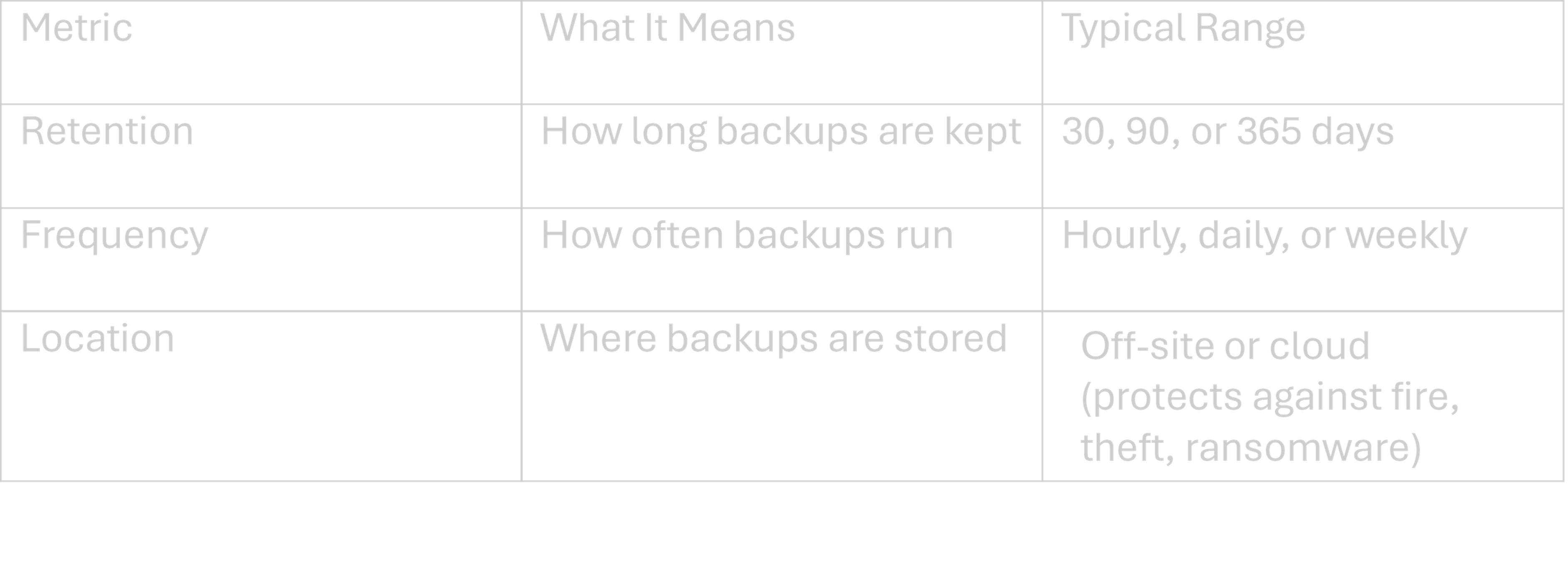
Backup vs disaster recovery: Backups store your data. Disaster recovery planning covers how quickly the business can be up and running after an incident - including temporary hardware or cloud servers if your main systems are compromised.
Testing: Good contracts state how often backups are tested with real restore drills. Quarterly trial restores, documented by the provider, give confidence that recovery will actually work when needed.
Scenario: Imagine a crypto-locking ransomware incident hitting your business in June 2025. With a solid IT support contract, your provider would isolate affected systems, restore clean backups from the previous day and have critical operations running within hours rather than days. Without clear backup provisions, you might discover too late that your data wasn’t being backed up at all - or that restoring it takes weeks.

What’s In Scope: Devices, Software and Locations Covered
Scope is where many misunderstandings arise. Your contract should specify exactly which devices, systems and locations are the provider’s responsibility.
Typical in-scope items for small UK firms:
- Company-owned laptops and desktops
- A small on-premises server (if present)
- Network switches and Wi-Fi access points
- Standard printing and scanning equipment
Cloud services coverage: Support for Microsoft 365, Google Workspace, or line-of-business systems like CRMs often means user access issues and basic configuration - not development or customisation of those platforms. For Microsoft 365, support and available features may differ depending on whether you have a personal account, are family subscribers, or use an enterprise subscription. Certain features, such as Copilot, are only available to specific subscription types - enterprise users may have access to advanced business features, while family subscribers and personal account holders have access to features included in their respective plans.
BYOD grey areas: Staff-owned mobile devices and home PCs often sit in a grey area. The contract should explicitly include or exclude these, especially for remote and hybrid working arrangements common since 2020.
Location coverage: Consider your main office, any branch offices, and home workers. Check whether on-site visits are included within a radius (for example, within 25 miles of the provider’s office) or charged separately as call-outs.
Check the asset list or “schedule” attached to your contract. Update it at least annually as the business grows or changes - new starters, new laptops, and new locations all need adding.
AI-Powered Tools and Resources in Modern IT Support
The landscape of IT support is rapidly evolving, thanks in large part to the integration of AI-powered tools and resources. Solutions like Microsoft 365 and the Microsoft 365 Copilot app are transforming how businesses approach productivity, collaboration and security. With features such as Copilot Chat, users can interact with an everyday AI companion to answer questions, streamline tasks and gain valuable insights - all within their favourite Microsoft services and apps. On the security front, tools like Microsoft Defender leverage AI to detect and respond to threats in real time, providing an extra layer of protection for your business. As these technologies continue to advance, service providers are able to offer more proactive, personalised and efficient support, ensuring your organisation stays secure and competitive in a digital-first world.
Service Levels, Escalation and Out-of-Hours Cover
Service levels matter to owners and managers because they determine how quickly the business can expect help when something goes wrong - and who is accountable if it takes too long.
Priority levels explained:
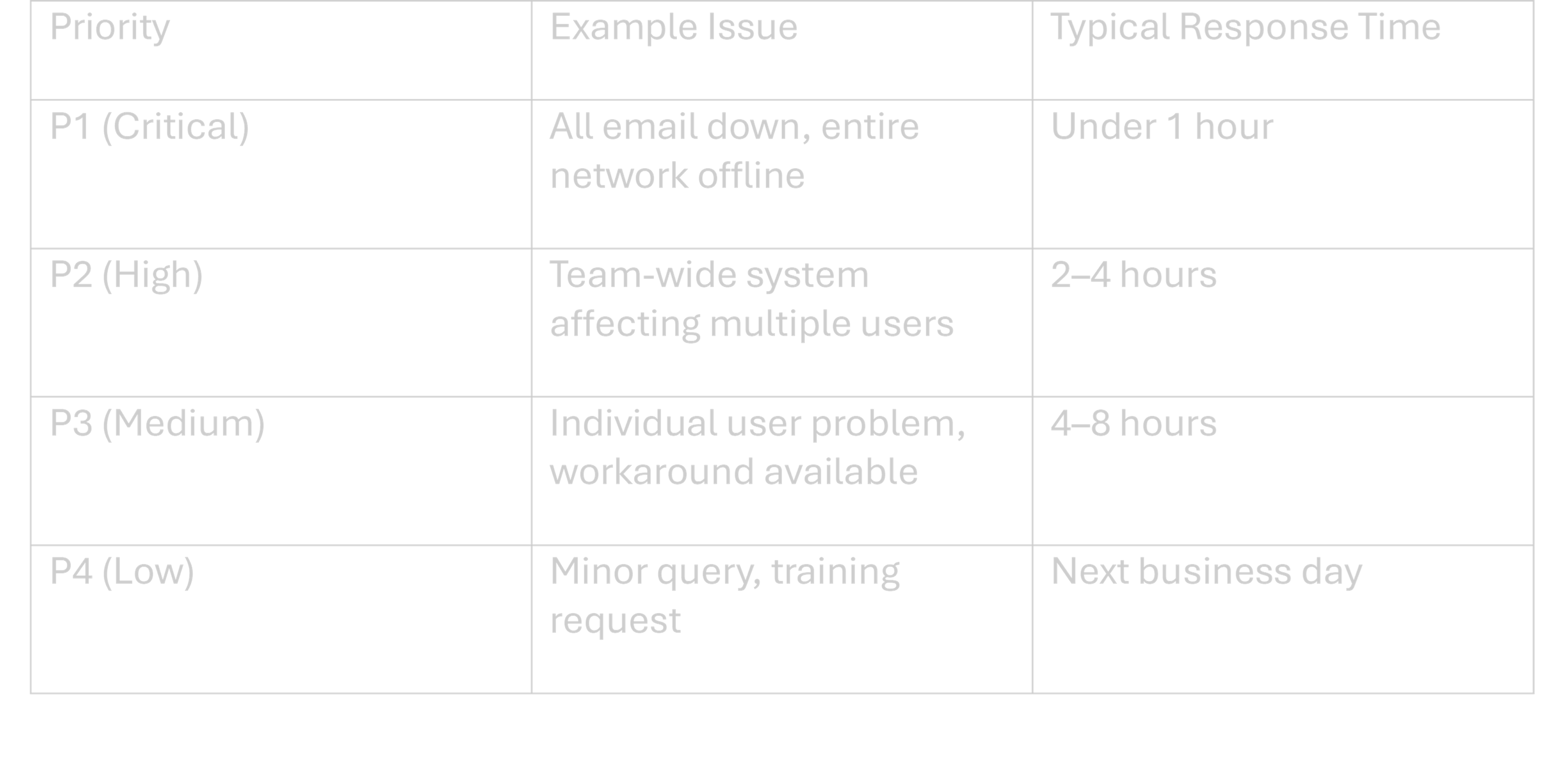
Escalation paths: What happens if an issue isn’t resolved within agreed times? Who does it escalate to, and how can you as the customer escalate if you’re unhappy? This should be documented.
Out-of-hours support: Check whether evenings, weekends, and UK bank holidays are covered. This is often an optional extra, with emergency call-outs charged at higher rates (sometimes £150–250 per incident).
“Best endeavours” vs strict SLAs: Some contracts promise to try hard without guaranteeing specific outcomes. Risk-sensitive businesses - financial services, legal firms, healthcare - may need tighter guarantees with penalty clauses for breaches.
Align your IT SLAs with internal business expectations. If you’ve told staff that IT will respond within 30 minutes but your contract only guarantees 4 hours, there’s a disconnect that will cause frustration.
What’s Not Included: Common Exclusions and Extra Costs
The “small print” on exclusions often causes the biggest disputes. It’s better to know about them upfront than to discover them during a crisis. Always check the contract for any hidden costs to ensure transparency and avoid unexpected charges.
Common exclusions in plain language:
- Major projects (office moves, large system rollouts)
- New server installations or significant hardware changes
- System migrations (moving to new software platforms)
- Custom software development or bespoke integrations
- User errors like spilt coffee on laptops or accidental data deletion
Third-party applications: Many managed service providers will liaise with vendors - Sage, industry-specific software, specialist applications - but they’re not responsible for fixing bugs in those products. The distinction should be clearly stated. Some providers may offer a free initial consultation or basic support for certain third-party applications as part of the contract, so ask if any services are included at no extra cost.
Old or unsupported systems: Windows Server 2012, Windows 7, or hardware over seven years old may only receive “best efforts” support with no guarantees. Providers often exclude these to manage their own liability.
Hardware, licences, and consumables: PCs, laptops, Microsoft 365 licences, printer toner and similar items are usually billed separately, even if the service provider helps specify and order them. Clarify if any free resources or basic tools are available as part of your package.
Questions to ask your provider about extras:
- How is ad-hoc project work quoted (hourly rates vs fixed-price)?
- What’s the day rate for on-site engineers if needed outside scope?
- Are there any fair-use limits on helpdesk tickets?
- What notice do you need for scheduling project work?
Costs, Contract Length and Exit Clauses
IT support for small businesses is usually priced per user or per device on a monthly basis. The contract should make costs transparent and predictable - no hidden surprises.
Realistic 2025 UK price ranges:
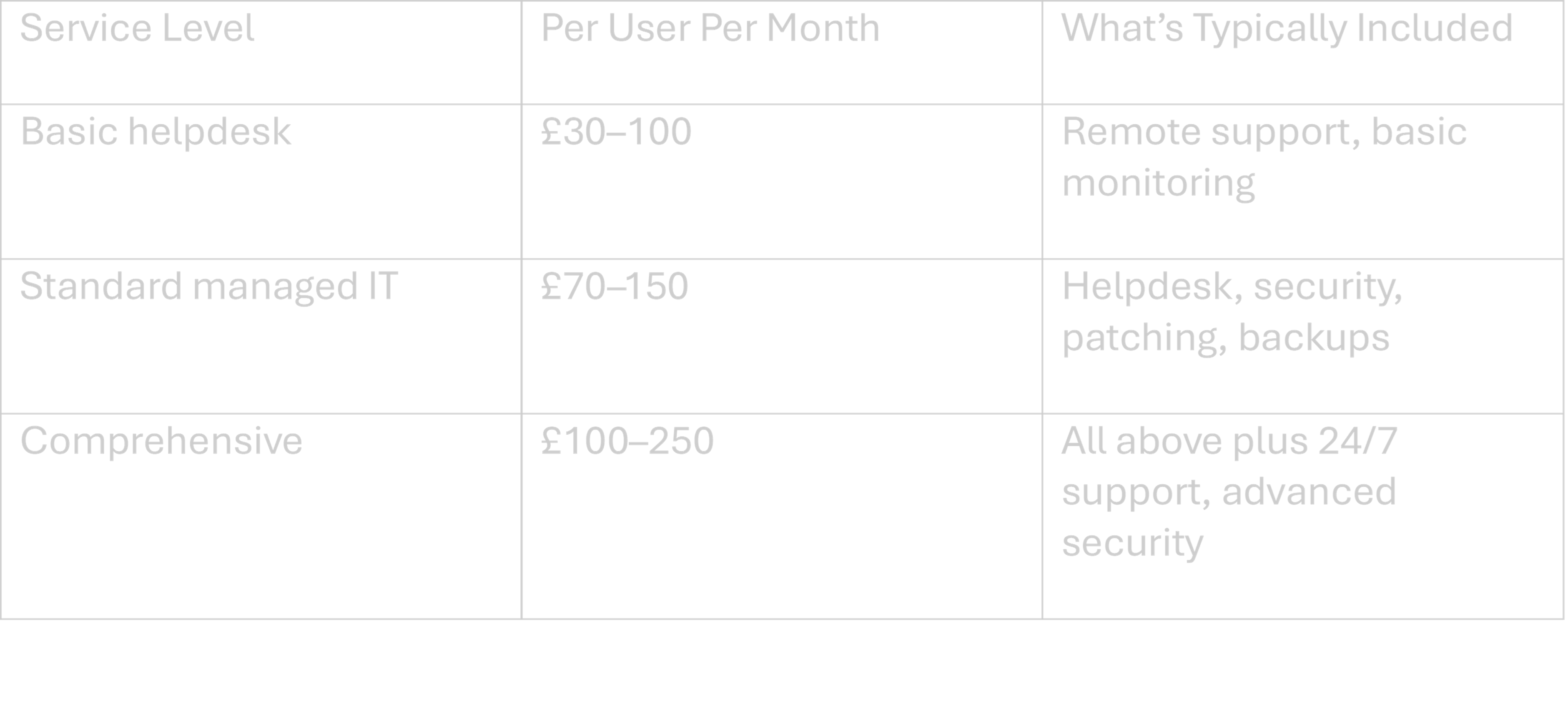
Prices vary based on complexity, number of users, and whether you need specialist compliance support (such as for legal or financial firms).
Common contract terms:
- 12-month, 24-month, or 36-month agreements
- Notice periods typically 30–90 days before renewal
- Automatic renewal if no action is taken (check this carefully)
Exit clauses to review:
- Data ownership and how it’s transferred to a new provider
- Handover of administrator passwords and documentation
- Any exit fees or restrictions on leaving early
- Timeline for the handover process
Annual price review clauses: Many contracts include terms tied to CPI inflation plus a percentage (for example, CPI + 3%). In plain terms, if inflation is 4%, your monthly fee might rise 7% at renewal. Factor this into budget planning.
Well-written contracts protect both sides and reduce conflict if the relationship ever ends. Don’t be alarmed by detailed terms - they’re usually there for good reasons.

How to Review Your Current IT Support Contract
Many SMEs signed their IT contracts years ago and haven’t revisited them, even though reliance on cloud services and remote work has grown significantly since 2020.
Step-by-step checklist approach:
- Print your contract (yes, on paper)
- Highlight what’s included under each category
- Note anything unclear or ambiguous
- Compare against the headings in this article: helpdesk, security, backup, scope, SLAs, exclusions, costs
Involve the right people: Get both a non-technical manager (who understands business priorities) and someone who uses the IT systems day-to-day to sense-check whether the contract matches their actual experience.
Get clarity in writing: Ask your provider for an updated service schedule or written clarification on any grey areas. Verbal promises don’t help when there’s a dispute.
Consider an independent review: A one-off audit with a trusted provider can highlight gaps without immediately requiring you to change suppliers. It’s about understanding your position, not making hasty decisions.
Keep this exercise practical. An office manager or finance manager should be able to work through the review in an afternoon without needing technical expertise.
Conclusion: Using the Contract to Reduce Risk, Not Add Complexity
An IT support contract is essentially a risk-sharing document. It defines how much IT risk the business is handing to a service provider and what remains in-house.
- The main areas to be clear on: day-to-day support, cyber security, backups, scope, service levels, exclusions, pricing and exit terms.
- Don’t be intimidated by legal language. Ask your provider to explain anything you don’t understand in plain English - good providers will do this willingly.
- If a contract doesn’t currently reflect how the business works in 2025 (remote staff, cloud systems, compliance needs), it’s reasonable to ask for it to be updated at the next renewal.
If you’re unsure what your contract actually covers today, an independent review or second opinion can quickly highlight any important gaps before they turn into problems.
FAQs: IT Support Contracts for Small Businesses
This section answers common follow-up questions SME owners and managers ask after reviewing their IT support agreement.
How much does IT support usually cost for a small business in the UK?
Most SMEs pay between £30 and £250 per user per month, depending on the level of service. Basic helpdesk and monitoring sits at the lower end, while comprehensive packages including advanced security, 24/7 support, and disaster recovery cost more. A 20-user business might budget £2,000–4,000 monthly for a fully managed service.
What’s the difference between break-fix and a managed IT support contract?
Break-fix is pay-as-you-go: you call when something breaks and pay hourly for the repair. A managed contract is proactive and all-inclusive - you pay a fixed monthly fee for ongoing monitoring, maintenance and support. Managed contracts typically cost more upfront but save money long-term by preventing problems and reducing downtime.
Do we still need an IT support contract if we use Microsoft 365 and cloud apps for everything?
Yes. While Microsoft and other cloud providers look after their platforms, your business still needs support for devices (laptops, printers, Wi-Fi), security configuration, Microsoft 365 user issues, data backups beyond what the cloud provider offers, and general helpdesk queries. Cloud doesn’t eliminate the need for hands on support - it changes what that support covers. Additionally, Microsoft 365 now includes Microsoft Copilot, an AI assistant that helps users create documents, presentations and other content using AI-powered features, making productivity tools even more powerful but still requiring expert support for setup and troubleshooting.
Can I change IT provider if I’m unhappy with the service?
Yes, but check your notice period first (typically 30–90 days). Plan the handover carefully: ensure you receive all administrator passwords, access credentials and IT documentation before the old contract ends. Good providers will support a smooth transition even when you’re leaving. Watch for any early exit fees if you’re ending before the contract term.
What should I do if my IT provider isn’t meeting the agreed service levels?
Start by documenting specific incidents where SLAs weren’t met - dates, times, and impact. Raise this formally with your account manager or provider’s management. Most contracts include escalation processes and in some cases, service credits for repeated failures. If problems persist, this documentation also helps if you need to exit the contract early or negotiate better terms.
Need some help?
If you are unsure whether your current I.T set-up is genuinely supporting your business or quietly exposing it to unecessary risk, a short independent review can help make things much clearer.
Serveline works with SME's with 10-250 Employees, helping simplify IT, reducing disruption and making sure the basics are genuinely covered (not just assumed) - giving business owners peace of mind. Click HERE to request a free review.


%20(1).webp)



-svg.webp)

